Reviewed Version: yui_editor-6.x-2.0
Depends on: Yahoo YUI
VERDICT: Outstanding! The only lovable Drupal WYSIWYG editor . Painless Installation, Great First Impressions, Easy to configure, image Uploading/insertion works out of the box, editor behavior solid and intuitive, and offers good security features.
In our last review of WYSIWYG editors, a certain editor won because it met my low expectations. Thanks to the tip from Sanjeev, I found an editor so good its off the charts.
The moment after I installed YUI Editor I found this refreshing WYSIWYG smiling at me.
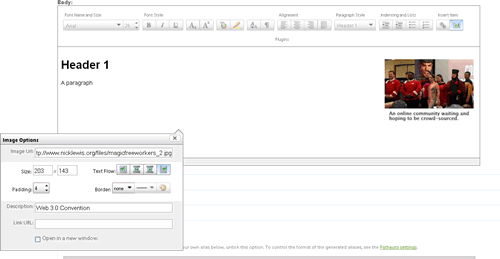
By default, the module uses files hosted by yahoo to avoid having to download install 3rd party scripts. For those who feel squeamish about this, the module allows you to set the include path to somewhere locally on your server. However, for most users, this setup means one less step, one less thing to screw up, and one less 3rd party library to track.
Managing which buttons you want to include, or exclude on your editor couldn't be easier. You just drag and drop the buttons into enable or disable blocks, hit save and done.
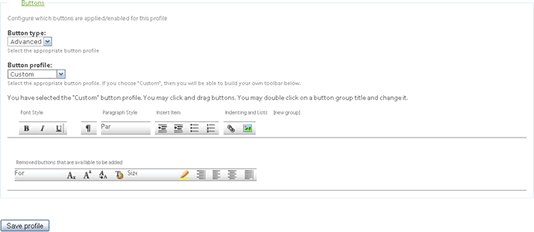
When I looked over the other profile settings, I was flabbergasted. I had control over everything that I cared about, and I don't care about much:
Bravo!
If enabled, this even works out of the box!
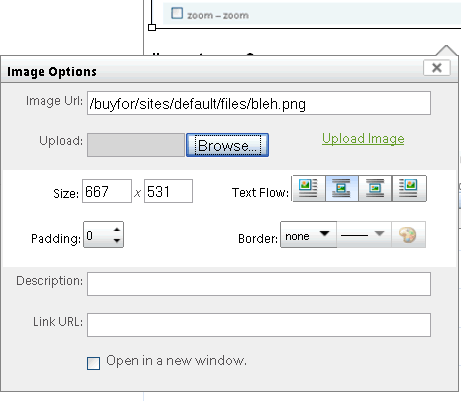
This editor doesn't guess what a paragraph is, instead it takes a different approach: hitting return twice, creates a blank line that becomes a paragraph. Hitting return creates a simple break tag. Lists, and headers work better than any other editor I've used. It feels good to write in this editor!
Alas, there were a few things I didn't like:
If you need a drupal wysiwyg editor, this one is the first one I'll think of.
Comments
i'd like intrudce a website
i'd like intrudce a website you will have the opportunity to wholesale jewelry The site is very clear when it comes to providing you with all the jewelry wholesale information you need
Theoretically, it shouldn't
Theoretically, it shouldn't be that bad if you don't have disable cache on in firebug.
Its probably just way too broad of a scope to include the files in the code....
GOOD LIFE GODO
GOOD LIFE GODO WORK!
.............................................
.............................................
Koxp indirebilir Koxp
Koxp indirebilir
Koxp Bulabilir
Albüm indir indirebilir
Xat ta chat yapabilirsiniz
Koxp indirebilir
Hi, I am using the editor
Hi,
I am using the editor with basic buttons from:
http://developer.yahoo.com/yui/editor/
and almost have it working, however on my site, rather than seeing the editor
all I get is text based instructions on how to use the editor appearing above
the text area.
This text comes from editor-min.js as can be found at:
http://yui.yahooapis.com/2.7.0/build/editor/editor-min.js
Can anyone tell me why the editor does not appear and instead I get all this
text appearing. The text I get is below:
"This text field can contain stylized text and graphics. To cycle through all
formatting options, use the keyboard shortcut Control + Shift + T to place focus
on the toolbar and navigate between option heading names.
Common formatting keyboard shortcuts:
Control Shift B sets text to bold
Control Shift I sets text to italic
Control Shift U underlines text
Control Shift [ aligns text left
Control Shift | centers text
Control Shift ] aligns text right
Control Shift L adds an HTML link
To exit this text editor use the keyboard shortcut Control + Shift + ESC"
Then the text area appears and then I get:
"You have left the Rich Text Editor."
I am pretty sure I have all the right div elements wrapped around the textarea
and accompanying script with the correct id and class attributes as instructed.
Just wondering what would be causing this to appear
Regards
Chris
Trying out this module for an
Trying out this module for an intranet collaboration site, and two big showstoppers so far, both on the Mac. In Firefox, Command+Left should move the cursor to the beginning of the current line; instead it goes back a page in the browsing history (like the back button) and all work is lost.
In Safari, it is not possible to save or even preview a page.
Too bad, the UI looks nice. This is using the latest RC2 release.
Best of luck with coding this
Best of luck with coding this the interface is certainly something that can be done in python as can most of the code but a few parts are jobs for C. hopefully these low level parts can be pulled out of the main code and run seperately making everything nice and easy.
marirea sanilor
does it support
does it support table-editing? if not, how can you call it outstanding!??
Tables? Seriously this must
Tables? Seriously this must be a joke.... hahahhaha i get it
I'm curious. Your sample
I'm curious. Your sample image has a caption under the photo. I can't figure out how to do this. Once I figure out how to add captions I'm giving this a go!
Yea, I really love the slick
Yea, I really love the slick interface and all, but all of the css/js files can really bog down a site (especially when you have a decent size user base with wysiwyg access).
Playing around with the module there are pre-packed/min'd yui files that you can get to reduce the number of files to load, but we're still talking around 200kb+ of files for a textarea. Not too mention additional overhead/latency issues from the additional file objects.
I'll stick with FCKEditor for now, as I can aggregate the css/js files, and it only requires ~6 files (3 when aggregated) for an additional ~30kb before compression.
One question, exist one rich
One question, exist one rich editor that supports the insertion of PHP Code?
Thanks!
Diego Drigani
-------------------------------
www.codeloper.com
Live from Udine, Italia
-------------------------------
Thanks for the WYSIWYG
Thanks for the WYSIWYG editor. Didn't know there was such a thing for Drupal. It's a big help.
It has one major bug:
It has one major bug: resizing the text area leads to the loss of all unsaved text - a very nasty bug.
There is also a resizing bug that lets one resize to outside the "column" of the text area. If you resize out to the right, after this you lose access to the resize element because it is outside the visible area and one is unable to resize back to the original size without reloading the page.
If these and a couple of other minor issues are fixed, YUI would be my first choice for WYSIWYG editor as well.
Hmm - I chose to go
Hmm - I chose to go all-jQuery-all-the-time since it's there in Drupal anyway. I like some of the cool stuff you can do with YUI, but I too am concerned about the performance hit of including yet another library.
Yes, its really only good
Yes, its really only good backend wysiwyg for composing content -- if you're pasting word docs, for example, its not going to work.
Hi Very nice Drupal WYSIWYG
Hi
Very nice Drupal WYSIWYG editor - I use it on several websites and I know the users are happy
:)
Morten
www.lille-web.dk
I like the way YUI looks, but
I like the way YUI looks, but without file uploading capabilities it's a no go for me.
The thing I really dislike
The thing I really dislike here, is the completely off-Drupal image-uploading. I want *integration*, not Yet Another Potential Security Hole (or Yet Another Concept To Learn To Use).
* Re-use my CCK file attachements
* Re-user Core's attachement system
* Re-use image.module images
etc
This is the reason why we dropped all WYSIWYG image integrations ATM, and are -indeed- looking at YUI. YUI allows us to build this (and share it!). But I consider "image upload" to not work OOTB as the author states. In fact: my advice is to remove this alltogether.
Bèr
Yeah, but my clients just
Yeah, but my clients just want to be upload an image into their posts without a lot of fuss.
Off course that is what your
Off course that is what your clients want.
That is why I think that once they are used to DRUPAL's upload and image system, it is stupid to make them learn another one that is specific for those places where they use the WYSIWYG.
Then follows teaching them
Then follows teaching them about "style="float:left;margin:0 1em 1em 0;"
I wish more would take the time to learn.
These days I'm using WYSIWYG API + image assist...
No real complaints other than them wondering why there has to be so many steps to entering an image into the copy.
2.6.1 was released to fix a
2.6.1 was released to fix a couple of the errors mentioned here. Namely, support for YUI 2.5.x and 2.6.x. Loading of JS files on admin pages. Fix with using drupal_add_js.
That sounds good, but how
That sounds good, but how extensible is it? If I need a specialized widget button, can one be added?
Yeah, you can extend it. It's
Yeah, you can extend it. It's YUI. Learn the YUI way and you can add or remove buttons at will. You can even add much more advanced functionality such as adding a reference to a node. If you do that, please contribute it. :-)
Interesting. Mind to add YUI
Interesting. Mind to add YUI editor to Wysiwyg API? :) If users do not even need to download an external library, this sounds like a nice candidate.
Was that a challenge? ;-)
If you set the YUI editor to
If you set the YUI editor to only show up on node/add/* and node/*/edit pages, it will not include all the JS and CSS files on rest of the pages.
Also, this reduces the need to have exclude tag ...
Oye seems to break it.
I just fixed this. It is in
I just fixed this. It is in 2.6.1 release. Hopefully I didn't break anything else in the process. I just got a person who is going to help me with QA so my releases aren't so buggy (hopefully).
Hey, Thanks for taking the
Hey,
Thanks for taking the time to share your WYSIWYG with the rest of the world! I will definitely try the YUI Editor.
Also, there's a broken image in this blogpost under "Image Uploading/Insertion works out of the box!".
Greetings from Sweden,
Jens
I was also impressed with
I was also impressed with this editor.
There is just one thing it could learn from certain other WYSIWYG editors: being able to configure textareas you DO NOT want it to be invoked on. The only alternatives right now are to include all textareas by leaving the configuration list blank, or by painfully having to list all paths (wild card regular expressions allowed) you wish it to be invoked upon. So, for example, you cannot exclude, say, admin/build/* or admin/build/block, to be able to include php code.
As an alternative, I would miss the possibility of enabling and disabling the editor on the fly.
Otherwise, very smooth, very nice editor, with a very "highly integrated" feel.
Victor Kane
http://awebfactory.com.ar
It appears to allow you to
It appears to allow you to include it on the basis of textarea id.
The loading of javascript and
The loading of javascript and css on every page visit if you have permission is the main thing that put me off. The performance penalty was very noticeable. I should experiment with storing them locally to see if that helps at all.
Couldn't the javascript be
Couldn't the javascript be cached by using the respective aggregator module available?
My be problematic given the
My be problematic given the drupal conventions that need to be followed for cacheable js. I bet yahoo provides a packed version however.
Theoretically, it shouldn't
Theoretically, it shouldn't be that bad if you don't have disable cache on in firebug.
Its probably just way too broad of a scope to include the files in the code....
Post new comment